2×2 Inch Passport Photo Maker

Last Update: February 1, 2026

Create a fully compliant 2×2 inch US passport photo from home in just minutes. Upload your photo and our tool automatically formats it to official US passport standards, following the latest requirements from the U.S. Department of State.

No photo studio. No guesswork. No app downloads.

Why Choose IDPhotoDiy?

IDPhotoDiy helps you create a professional passport photo quickly and easily:

  • Exact 2×2 inch (51 × 51 mm) photo size

  • Correct head position and proportion

  • Plain white or off-white background

  • Fully compliant with US passport photo requirements

  • Photo ready in about 3 seconds

  • Retakes until you’re satisfied

If the result doesn’t look right, simply retake your photo and reprocess it instantly.

How IDPhotoDiy 2X2 photo converter Works

IDPhotoDiy 2X2 photo converter Works can convert your original photo into 2X2 inch format within a few seconds in just 4 steps:
  1. Upload your photo 

To start, Choose "United States" and then click "Passport(2X2 inch), Visa (2X2 inch), ,  or  " according to your needs. Then click "Create your photo now" to upload your photo.

      2. Crop your photo

Move the box and adjust the corners to make sure the chin and the top of the head must fit into the blue bars.

      3. Click and Choose the Ajustment you like most

      4. Download your photo

Get a passport-ready image suitable for printing and online submission.

US Passport Photo Requirements

  • Photo size: 2 × 2 inches
  • Head size: Between 1 inch and 1⅜ inches (22–35 mm), or 50%–69% of the image height
  • Background: White or off-white
  • Expression: Neutral, eyes open
  • Color: Required
  • Resolution: Minimum 300 DPI
  • File size limits:

Passport, visa, citizenship, or green card: 54 KB - 10 MB

DV Lottery: 240 KB or less

Not sure if your photo meets all requirements? IDPhotoDiy automatically handles sizing, background, and formatting for you.


Click here to make passport / visa photos
Other passport pictures guides

How to take passport photo in 5 steps?


Step 1: Use a digital camera or a smartphone to take a photo

Find someone to take the photo for you and selfie photo is not acceptable for passport photo application. If you have a tripod, use it. A tripod will make it easier to keep the camera steady and level. The distance of the person to the camera should be around 1 meter.


Step 2: Find a venue with good lighting

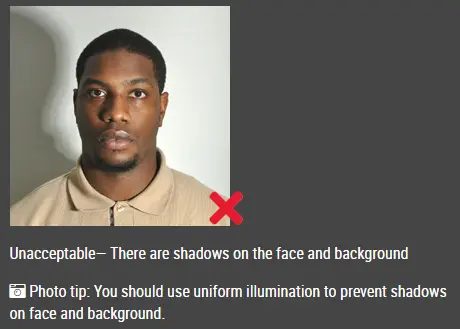
When taking photo, you should face the light, such as a nice bright window or the door. This can provide even lighting to avoid shadows on the face and background. The face must be evenly lit. There should be no shadows and glares on the face.

Note: No need to worry about the background as our online passport photo generator will automatically remove or change the background for you.

unacceptable passport photo


Step 3: Wear properly for your passport photo

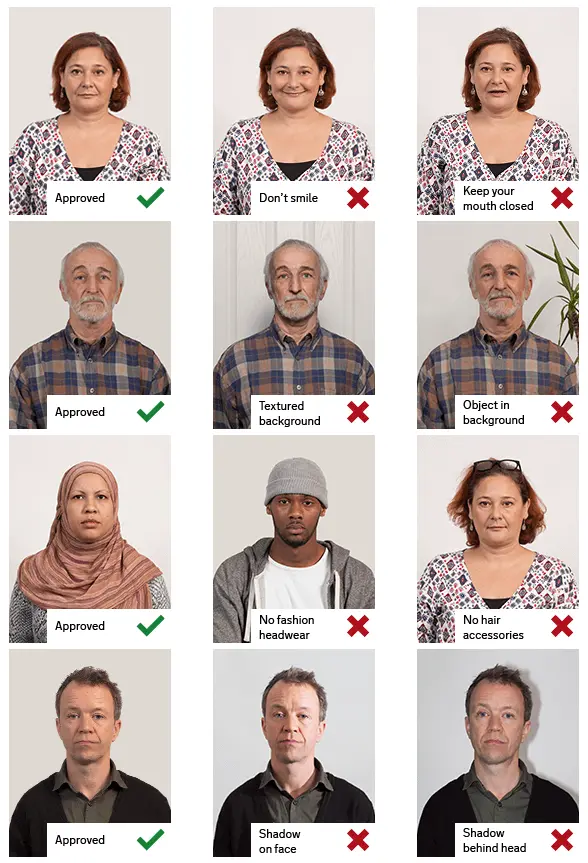
Do not wear uniforms. Wear regular street clothes in your photo.

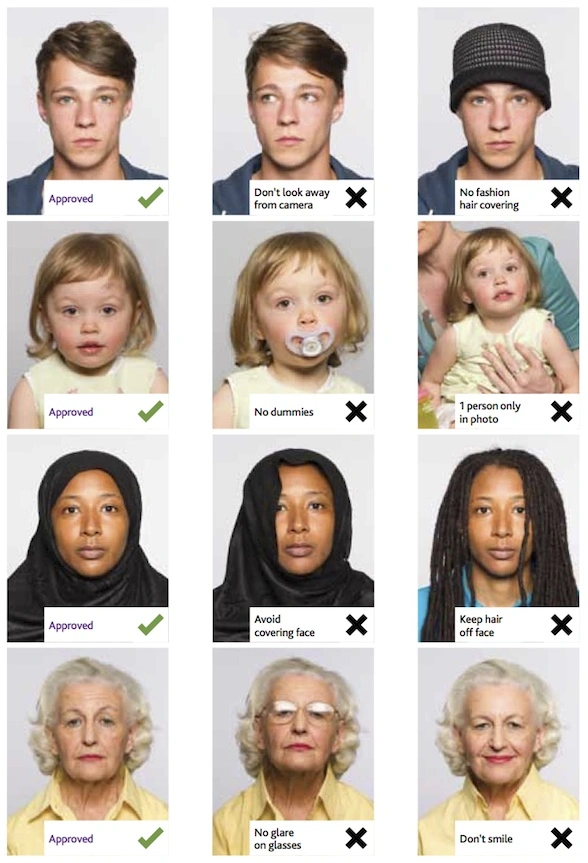
Do not wear eyeglasses. If you wear glasses, sunglasses, or tinted glasses, take them off for your passport photo.

Your face must still be fully visible.  Don’t let your hair drape over your face and obscure your eyes. If you have very long bangs that cover your eyebrows, you should pin them back with bobby pins. It’s best if your ears show, as well, but that won’t cause your photo to be rejected.

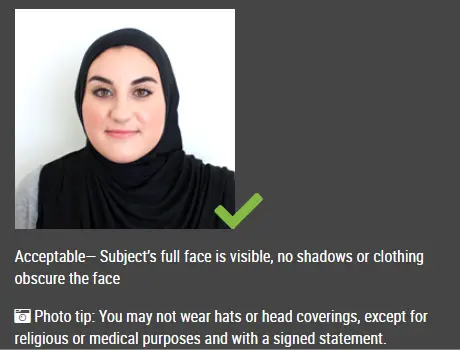
No hats are allowed in passport photos unless it is religious headgear such as a headscarf or yarmulke that you wear every day.

acceptable passport photo

Step 4: Pose for a passport

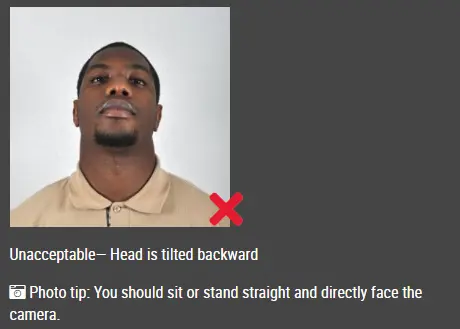
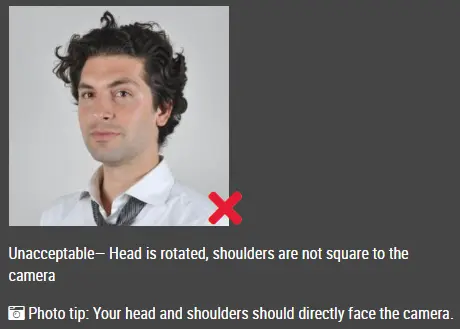
Look straight towards the camera with face straight on. Head should not be tilted or rotated.

Both ears showing or both edges of the face visible if hair covers the ears.

Shoulders should be visible, and there should be enough space around the head for cropping the photo.

Position the camera in the same height as the head.

unacceptable passport photo

unacceptable passport photo


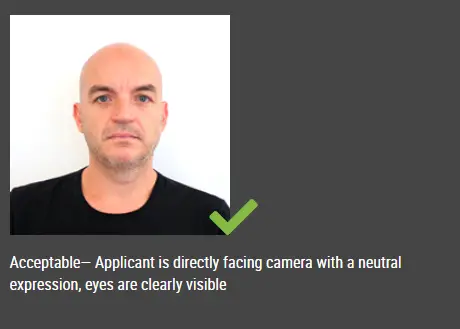
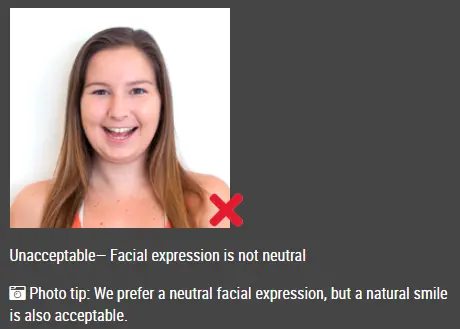
Step 5: Have a neutral facial expression

You can smile in your passport photos, but the government prefers that you have a neutral facial expression.

Smiling or having your mouth open is usually not acceptable, especially under the new international passport rules.

acceptable passport photo

Unacceptable passport photo


Good and bad passport photo examples

Example of passport photos

Printed passport photos

Online Passport Photo Generator

Is this document useful?