United States Passport Photo Maker
2x2 inch (51x51 mm, 5.1x5.1 cm) Size and Requirements


| Country | United States |
| Document type | Passport |
| Passport picture size | Width: 2 inch, Height: 2 inch |
| Resolution (DPI) | 600 |
| Image definition parameters | Head must be between 1 -1 3/8 inches (25 - 35 mm) from the bottom of the chin to the top of the head |
| Background color | White |
| Printable photo | Yes |
| Digital photo for online submission | Yes |
| Digital photo size | Width: 1000 pixels , Height: 1000 pixels |
| Photo Paper type | matte |
|
Detailed requirements Last Update: July 27, 2026 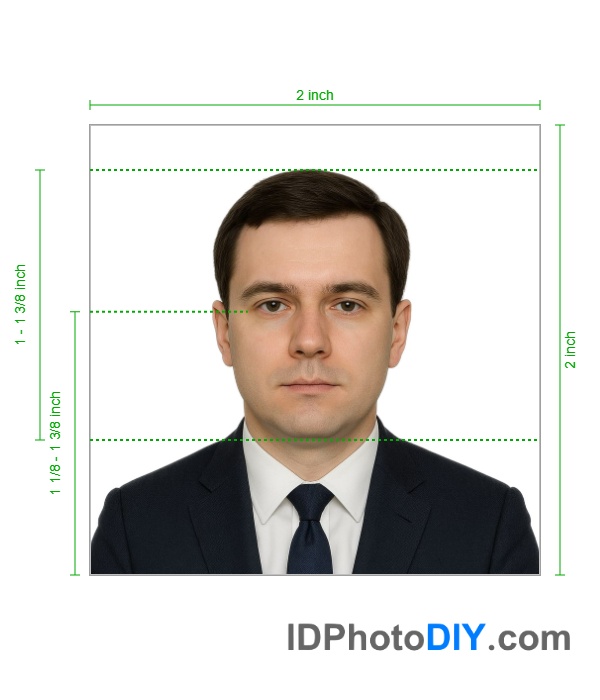 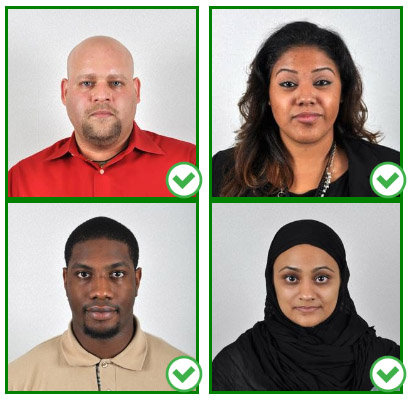 You must provide one photo with your passport application. Photo Basics
Resolution, Print Size, and Quality
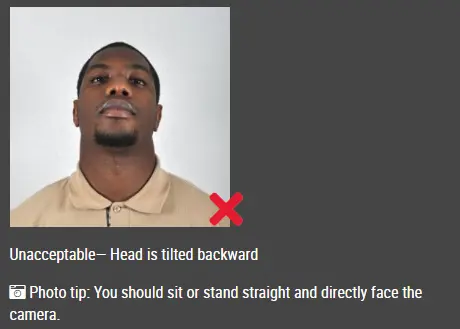
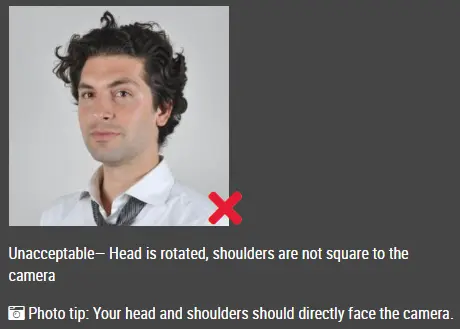
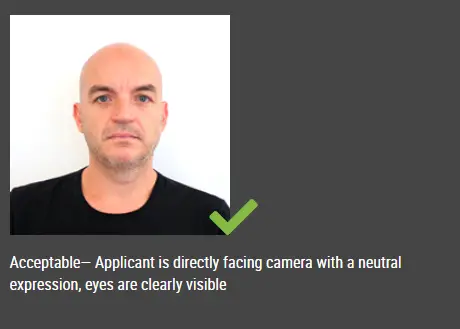
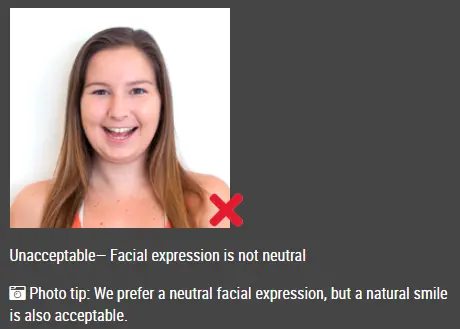
Pose and Expression
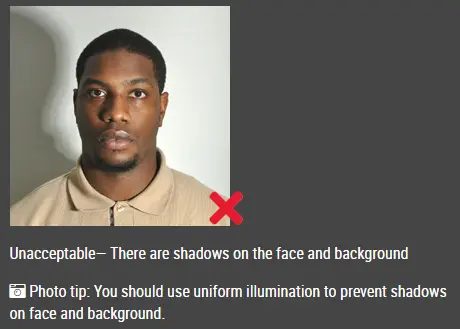
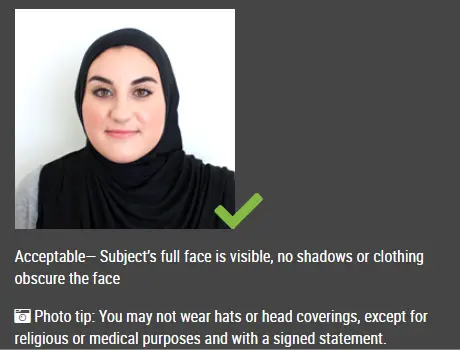
Acceptable— Photo is clear and in color, reproduces skin tones accurately, and is properly exposed with no shadows
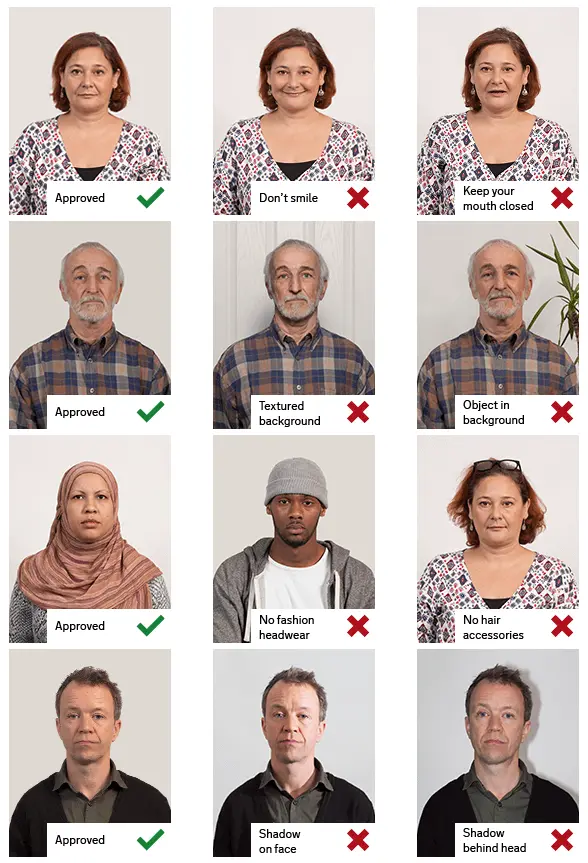
Printed Passport Photo (2 x 2 Passport Photo) If you're applying in person or sending in a paper renewal, you'll need to include a printed passport photo. Make sure your photo meets the following US passport photo requirements:
Digital Photo for Online Passport Renewal If you’re renewing your passport online, you’ll need to upload a digital photo as part of the application. Your photo need to meet the following US digital passort photo requirements:
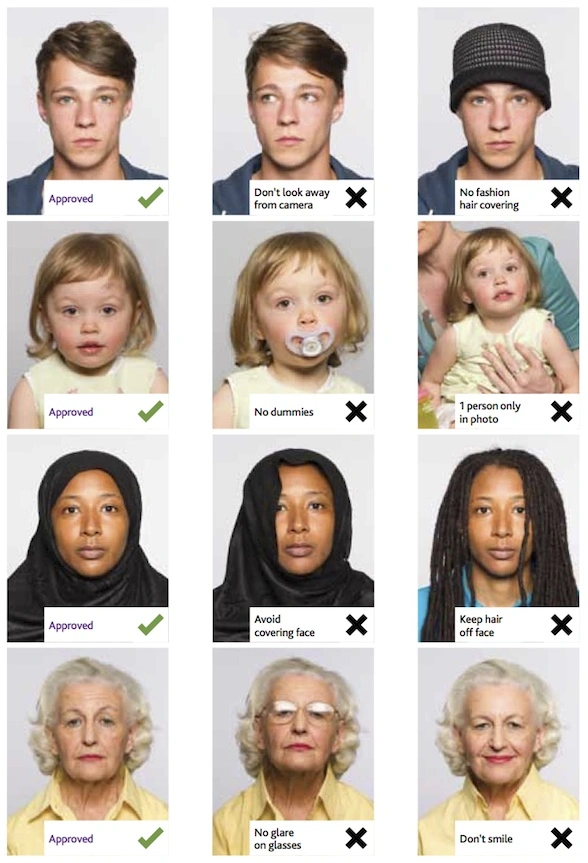
Baby and Child Passport Photo Requirements Every child, including newborns, needs their own passport photo. Taking a photo of a baby can be a bit tricky, but a simple setup usually works best. Lay your baby on a plain white or off-white sheet, making sure the background looks smooth and free of patterns or wrinkles. A few things to keep in mind:
It’s okay if a very young baby doesn’t have their eyes fully open. For older babies and children, both eyes should be open, and they should be looking toward the camera with a relaxed, neutral expression. If laying the baby down doesn’t work, you can also place them in a car seat covered with a plain white or off-white sheet. Just make sure no straps, hands, or other objects are visible in the final photo. Passport Photos Near Me or Online? You can visit a local passport photo service, pharmacy, or photo studio, but you can also prepare your photo from home with our passport photo maker to save time and money. Use our US passport photo maker to create a compliant 2x2 passport photo online. Upload a photo taken with your phone or camera to our US passport photo maker, it will crop it to the correct passport photo size, adjust the background, and prepare a digital photo for online renewal or a printable passport photo. The tool helps you follow key US passport photo requirements, including photo dimensions, head size, background color, and image resolution. Frequently Asked Questions Where can I get a US passport photo? You can get a passport photo from a pharmacy, photo studio, shipping store, or passport acceptance facility. You can also take a photo at home and use an online passport photo maker to crop it, change the background, and prepare it for printing or digital submission. What size does a U.S. passport photo need to be? For printed applications, the photo must be exactly 2 x 2 inches (51 x 51 mm). Your head should measure between 1 inch and 1⅜ inches (25–35 mm) from the bottom of your chin to the top of your head. How much does a passport photo cost? The cost depends on where the photo is taken and printed. Local pharmacies, photo studios, and shipping stores may charge different prices. Creating the photo online and printing it yourself may reduce the total cost. How many photos should I submit? You only need one color photo for a paper application. If you're renewing online, you'll upload a single digital photo instead. Can I take my passport photo myself? Yes, you can take it at home. It’s usually easier if someone else takes the photo, but a tripod or timer can work too. Just make sure the camera is level and your face is centered. Is it okay to use a selfie? Selfies aren’t recommended. Holding the camera too close can distort your face and make it harder to meet the framing requirements. It’s better to have someone else take the photo or use a tripod. Can I smile in my US passport photo? Keep your expression neutral. Your mouth should be closed, and both eyes should be open. A slight natural expression is fine, but avoid big smiles or showing teeth. Do I need a passport photo app? No app installation is required. You can use the online passport photo tool in a mobile or desktop browser to upload, crop, and prepare your photo. Yes, as long as it looks natural and doesn’t change your appearance. Avoid heavy makeup or anything that alters your features. Also, don’t use digital filters or retouching. Jewelry is generally fine as long as it doesn’t cover any part of your face or create glare that hides your features. Is it okay to wear a white shirt? You can, but it’s not ideal. Since the background is white or off-white, a darker shirt usually helps create better contrast. Can I scan a printed photo for online renewal? No. You need to upload the original digital photo. Scanning or taking a picture of a printed photo isn’t allowed. Can I print the photo on regular paper? No, you’ll need to use proper photo paper, either matte or glossy, for printed applications. Can I fix red eye using editing tools? It’s better not to edit the photo. Instead, adjust your lighting or camera settings and take a new picture without red eye. How recent does the photo need to be? Your photo should be taken within the last six months and should reflect how you currently look. |
|
| Source | https://travel.state.gov/content/tr... |