Passport Photo Background Requirements (Official Rules Explained)
Last Update: February 23, 2026
Passport Photo Background Requirements (Quick Answer)
A passport photo background must be plain, light-colored (usually white or off-white), evenly lit, and free of shadows, patterns, textures, or objects. The background should clearly contrast with the subject’s face and clothing to ensure accurate identification.
For full official rules, see our complete guide to passport photo requirements.
What Background Is Required for a Passport Photo?
Most passport authorities require the background to be:
-
Plain and uniform
-
White or off-white
-
Free of shadows
-
Free of objects or people
-
Non-textured
Using a blank wall or smooth backdrop usually meets passport photo background requirements.
Why Passport Photo Background Rules Matter
Passport photos are used for identity verification and biometric recognition. A simple background ensures facial features are clearly visible without distractions.
Photos with shadows, patterns, or incorrect colors may be rejected during application processing.
Passport Photo Background Requirements
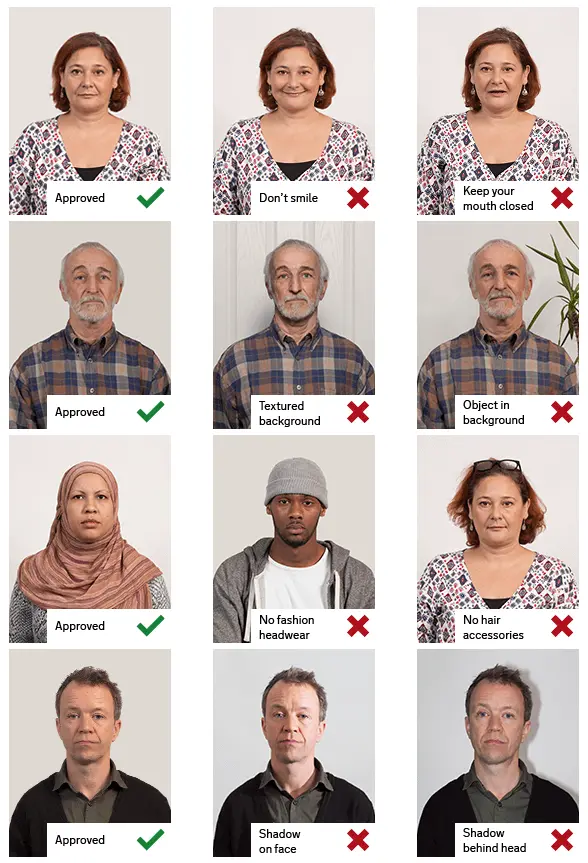
Use a Plain Background
The background must be solid and uniform.
Avoid:
-
Patterns
-
Curtains
-
Brick walls
-
Decorations
-
Furniture
-
Visible objects
A plain wall works best.
Use a White or Off-White Background
Passport photos typically require a white or off-white background to create strong contrast with the subject.
The background should:
-
Be light-colored
-
Appear consistent
-
Not blend with clothing
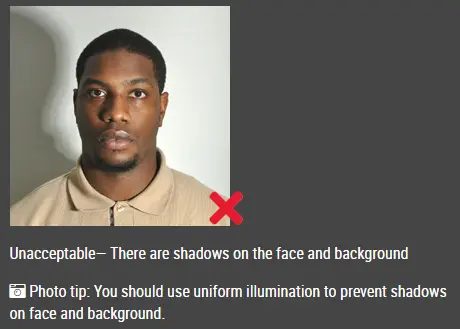
Avoid Shadows
Lighting should be balanced so the background looks smooth.
Ensure:
-
No shadow behind the head
-
Even lighting on both sides of the face
-
No dark patches on the wall
Two light sources placed evenly can help reduce shadows.
Keep the Background Clear
Nothing except the subject should appear in the photo.
Remove:
-
Picture frames
-
Furniture
-
Decorations
-
Other people
A clean background keeps the focus on the face.
Common Passport Photo Background Mistakes
The most common passport photo background mistakes include:
-
Gray backgrounds
-
Uneven lighting
-
Visible shadows
-
Patterned walls
-
Background objects
-
Overexposed white backgrounds
These issues frequently cause passport photo rejection.
FAQ: Passport Photo Background Rules
What color background is required for passport photos?
Most passport photos require a white or off-white background that is plain and evenly lit.
Can a passport photo background have texture?
No. The background must be smooth and uniform with no visible texture or patterns.
Can shadows appear on the passport photo background?
No. Shadows behind the head or on the background are not allowed.
Can I edit the passport photo background?
Digitally edited backgrounds may be rejected. A real plain background is recommended.
Click here to make passport / visa photos